|
Robot Framework
|


|
|
Robot Framework
|
|
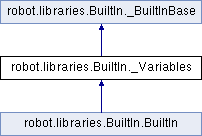
Public Member Functions | |
| def | get_variable_value (self, name, default=None) |
Returns variable value or default if the variable does not exist. More... | |
| def | get_variables (self, no_decoration=False) |
| Returns a dictionary containing all variables in the current scope. More... | |
| def | log_variables (self, level='INFO') |
| Logs all variables in the current scope with given log level. More... | |
| def | replace_variables (self, text) |
| Replaces variables in the given text with their current values. More... | |
| def | set_global_variable (self, name, *values) |
| Makes a variable available globally in all tests and suites. More... | |
| def | set_local_variable (self, name, *values) |
| Makes a variable available everywhere within the local scope. More... | |
| def | set_suite_variable (self, name, *values) |
| Makes a variable available everywhere within the scope of the current suite. More... | |
| def | set_task_variable (self, name, *values) |
| Makes a variable available everywhere within the scope of the current task. More... | |
| def | set_test_variable (self, name, *values) |
| Makes a variable available everywhere within the scope of the current test. More... | |
| def | set_variable (self, *values) |
| Returns the given values which can then be assigned to a variables. More... | |
| def | variable_should_exist (self, name, msg=None) |
| Fails unless the given variable exists within the current scope. More... | |
| def | variable_should_not_exist (self, name, msg=None) |
| Fails if the given variable exists within the current scope. More... | |
Private Member Functions | |
| def | _get_logged_variable (self, name, variables) |
| def | _get_var_name (self, original, require_assign=True) |
| def | _get_var_value (self, name, values) |
| def | _log_set_variable (self, name, value) |
| def | _resolve_var_name (self, name) |
Additional Inherited Members | |
 Properties inherited from robot.libraries.BuiltIn._BuiltInBase Properties inherited from robot.libraries.BuiltIn._BuiltInBase | |
| _context = property | |
| _namespace = property | |
| _variables = property | |
Definition at line 1462 of file BuiltIn.py.
|
private |
Definition at line 1525 of file BuiltIn.py.
|
private |
Definition at line 1788 of file BuiltIn.py.
|
private |
Definition at line 1817 of file BuiltIn.py.
|
private |
Definition at line 1832 of file BuiltIn.py.
|
private |
Definition at line 1804 of file BuiltIn.py.
| def robot.libraries.BuiltIn._Variables.get_variable_value | ( | self, | |
| name, | |||
default = None |
|||
| ) |
Returns variable value or default if the variable does not exist.
    The name of the variable can be given either as a normal variable name
    like ``${name}`` or in escaped format like ``$name`` or ``\${name}``.
    For the reasons explained in the `Using variables with keywords creating
    or accessing variables` section, using the escaped format is recommended.

    Examples:
    | ${x} =    `Get Variable Value`    $a    default
    | ${y} =    `Get Variable Value`    $a    ${b}
    | ${z} =    `Get Variable Value`    $z
    =>
    - ``${x}`` gets value of ``${a}`` if ``${a}`` exists and string ``default`` otherwise
    - ``${y}`` gets value of ``${a}`` if ``${a}`` exists and value of ``${b}`` otherwise
    - ``${z}`` is set to Python ``None`` if it does not exist previously
Definition at line 1510 of file BuiltIn.py.
| def robot.libraries.BuiltIn._Variables.get_variables | ( | self, | |
no_decoration = False |
|||
| ) |
Returns a dictionary containing all variables in the current scope.
    Variables are returned as a special dictionary that allows accessing
    variables in space, case, and underscore insensitive manner similarly
    as accessing variables in the test data. This dictionary supports all
    same operations as normal Python dictionaries and, for example,
    Collections library can be used to access or modify it. Modifying the
    returned dictionary has no effect on the variables available in the
    current scope.

    By default variables are returned with ``${}``, ``@{}`` or ``&{}``
    decoration based on variable types. Giving a true value (see `Boolean
    arguments`) to the optional argument ``no_decoration`` will return
    the variables without the decoration.

    Example:
    | ${example_variable} =         | Set Variable | example value         |
    | ${variables} =                | Get Variables |                      |
    | Dictionary Should Contain Key | ${variables} | \\${example_variable} |
    | Dictionary Should Contain Key | ${variables} | \\${ExampleVariable}  |
    | Set To Dictionary             | ${variables} | \\${name} | value     |
    | Variable Should Not Exist     | \\${name}    |           |           |
    | ${no decoration} =            | Get Variables | no_decoration=Yes |
    | Dictionary Should Contain Key | ${no decoration} | example_variable |
Definition at line 1489 of file BuiltIn.py.
| def robot.libraries.BuiltIn._Variables.log_variables | ( | self, | |
level = 'INFO' |
|||
| ) |
Logs all variables in the current scope with given log level.
Definition at line 1518 of file BuiltIn.py.
| def robot.libraries.BuiltIn._Variables.replace_variables | ( | self, | |
| text | |||
| ) |
Replaces variables in the given text with their current values.
    If the text contains undefined variables, this keyword fails.
    If the given ``text`` contains only a single variable, its value is
    returned as-is and it can be any object. Otherwise this keyword
    always returns a string.

    Example:

    The file ``template.txt`` contains ``Hello ${NAME}!`` and variable
    ``${NAME}`` has the value ``Robot``.

    | ${template} =   | Get File          | ${CURDIR}/template.txt |
    | ${message} =    | Replace Variables | ${template}            |
    | Should Be Equal | ${message}        | Hello Robot!           |
Definition at line 1596 of file BuiltIn.py.
| def robot.libraries.BuiltIn._Variables.set_global_variable | ( | self, | |
| name, | |||
| * | values | ||
| ) |
Makes a variable available globally in all tests and suites.
    Variables set with this keyword are globally available in all
    subsequent test suites, test cases and user keywords. Also variables
    created Variables sections are overridden. Variables assigned locally
    based on keyword return values or by using `Set Suite Variable`,
    `Set Test Variable` or `Set Local Variable` override these variables
    in that scope, but the global value is not changed in those cases.

    In practice setting variables with this keyword has the same effect
    as using command line options ``--variable`` and ``--variablefile``.
    Because this keyword can change variables everywhere, it should be
    used with care.

    See `Set Suite Variable` for more information and usage examples. See
    also the `Using variables with keywords creating or accessing variables`
    section for information why it is recommended to give the variable name
    in escaped format like ``$name`` or ``\${name}`` instead of the normal
    ``${name}``.
Definition at line 1780 of file BuiltIn.py.
| def robot.libraries.BuiltIn._Variables.set_local_variable | ( | self, | |
| name, | |||
| * | values | ||
| ) |
Makes a variable available everywhere within the local scope.
    Variables set with this keyword are available within the
    local scope of the currently executed test case or in the local scope
    of the keyword in which they are defined. For example, if you set a
    variable in a user keyword, it is available only in that keyword. Other
    test cases or keywords will not see variables set with this keyword.

    This keyword is equivalent to a normal variable assignment based on a
    keyword return value. For example,

    | ${var} =    `Set Variable`    value
    | @{list} =    `Create List`    item1    item2    item3

    are equivalent with

    | `Set Local Variable`    @var    value
    | `Set Local Variable`    @list    item1    item2    item3

    The main use case for this keyword is creating local variables in
    libraries.

    See `Set Suite Variable` for more information and usage examples. See
    also the `Using variables with keywords creating or accessing variables`
    section for information why it is recommended to give the variable name
    in escaped format like ``$name`` or ``\${name}`` instead of the normal
    ``${name}``.

    See also `Set Global Variable` and `Set Test Variable`.
Definition at line 1657 of file BuiltIn.py.
| def robot.libraries.BuiltIn._Variables.set_suite_variable | ( | self, | |
| name, | |||
| * | values | ||
| ) |
Makes a variable available everywhere within the scope of the current suite.
    Variables set with this keyword are available everywhere within the
    scope of the currently executed test suite. Setting variables with this
    keyword thus has the same effect as creating them using the Variables
    section in the data file or importing them from variable files.

    Possible child test suites do not see variables set with this keyword
    by default, but that can be controlled by using ``children=<option>``
    as the last argument. If the specified ``<option>`` is given a true value
    (see `Boolean arguments`), the variable is set also to the child
    suites. Parent and sibling suites will never see variables set with
    this keyword.

    The name of the variable can be given either as a normal variable name
    like ``${NAME}`` or in escaped format as ``\${NAME}`` or ``$NAME``.
    For the reasons explained in the `Using variables with keywords creating
    or accessing variables` section, *using the escaped format is highly
    recommended*.

    Variable value can be specified using the same syntax as when variables
    are created in the Variables section. Same way as in that section,
    it is possible to create scalar values, lists and dictionaries.
    The type is got from the variable name prefix ``$``, ``@`` and ``&``,
    respectively.

    If a variable already exists within the new scope, its value will be
    overwritten. If a variable already exists within the current scope,
    the value can be left empty and the variable within the new scope gets
    the value within the current scope.

    Examples:
    | Set Suite Variable    $SCALAR    Hello, world!
    | Set Suite Variable    $SCALAR    Hello, world!    children=True
    | Set Suite Variable    @LIST      First item       Second item
    | Set Suite Variable    &DICT      key=value        foo=bar
    | ${ID} =    Get ID
    | Set Suite Variable    $ID

    To override an existing value with an empty value, use built-in
    variables ``${EMPTY}``, ``@{EMPTY}`` or ``&{EMPTY}``:

    | Set Suite Variable    $SCALAR    ${EMPTY}
    | Set Suite Variable    @LIST      @{EMPTY}
    | Set Suite Variable    &DICT      &{EMPTY}

    See also `Set Global Variable`, `Set Test Variable` and `Set Local Variable`.
Definition at line 1747 of file BuiltIn.py.
| def robot.libraries.BuiltIn._Variables.set_task_variable | ( | self, | |
| name, | |||
| * | values | ||
| ) |
Makes a variable available everywhere within the scope of the current task.
    This is an alias for `Set Test Variable` that is more applicable when
    creating tasks, not tests.
Definition at line 1695 of file BuiltIn.py.
| def robot.libraries.BuiltIn._Variables.set_test_variable | ( | self, | |
| name, | |||
| * | values | ||
| ) |
Makes a variable available everywhere within the scope of the current test.
    Variables set with this keyword are available everywhere within the
    scope of the currently executed test case. For example, if you set a
    variable in a user keyword, it is available both in the test case level
    and also in all other user keywords used in the current test. Other
    test cases will not see variables set with this keyword.
    It is an error to call `Set Test Variable` outside the
    scope of a test (e.g. in a Suite Setup or Teardown).

    See `Set Suite Variable` for more information and usage examples. See
    also the `Using variables with keywords creating or accessing variables`
    section for information why it is recommended to give the variable name
    in escaped format like ``$name`` or ``\${name}`` instead of the normal
    ``${name}``.

    When creating automated tasks, not tests, it is possible to use `Set
    Task Variable`. See also `Set Global Variable` and `Set Local Variable`.
Definition at line 1683 of file BuiltIn.py.
| def robot.libraries.BuiltIn._Variables.set_variable | ( | self, | |
| * | values | ||
| ) |
Returns the given values which can then be assigned to a variables.
    This keyword is mainly used for setting scalar variables.
    Additionally it can be used for converting a scalar variable
    containing a list to a list variable or to multiple scalar variables.
    It is recommended to use `Create List` when creating new lists.

    Examples:
    | ${hi} =   | Set Variable | Hello, world! |
    | ${hi2} =  | Set Variable | I said: ${hi} |
    | ${var1}   | ${var2} =    | Set Variable | Hello | world |
    | @{list} = | Set Variable | ${list with some items} |
    | ${item1}  | ${item2} =   | Set Variable  | ${list with 2 items} |

    Variables created with this keyword are available only in the
    scope where they are created. See `Set Global Variable`,
    `Set Test Variable` and `Set Suite Variable` for information on how to
    set variables so that they are available also in a larger scope.
Definition at line 1618 of file BuiltIn.py.
| def robot.libraries.BuiltIn._Variables.variable_should_exist | ( | self, | |
| name, | |||
msg = None |
|||
| ) |
Fails unless the given variable exists within the current scope.
    The name of the variable can be given either as a normal variable name
    like ``${name}`` or in escaped format like ``$name`` or ``\${name}``.
    For the reasons explained in the `Using variables with keywords creating
    or accessing variables` section, using the escaped format is recommended.

    The default error message can be overridden with the ``msg`` argument.

    See also `Variable Should Not Exist` and `Keyword Should Exist`.
Definition at line 1550 of file BuiltIn.py.
| def robot.libraries.BuiltIn._Variables.variable_should_not_exist | ( | self, | |
| name, | |||
msg = None |
|||
| ) |
Fails if the given variable exists within the current scope.
    The name of the variable can be given either as a normal variable name
    like ``${name}`` or in escaped format like ``$name`` or ``\${name}``.
    For the reasons explained in the `Using variables with keywords creating
    or accessing variables` section, using the escaped format is recommended.

    The default error message can be overridden with the ``msg`` argument.

    See also `Variable Should Exist` and `Keyword Should Exist`.
Definition at line 1570 of file BuiltIn.py.
 1.9.1
1.9.1