|
Robot Framework
|


|
|
Robot Framework
|
|
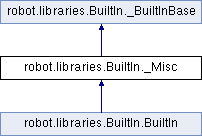
Public Member Functions | |
| def | call_method (self, object, method_name, *args, **kwargs) |
| Calls the named method of the given object with the provided arguments. More... | |
| def | catenate (self, *items) |
| Catenates the given items together and returns the resulted string. More... | |
| def | comment (self, *messages) |
| Displays the given messages in the log file as keyword arguments. More... | |
| def | evaluate (self, expression, modules=None, namespace=None) |
| Evaluates the given expression in Python and returns the result. More... | |
| def | get_library_instance (self, name=None, all=False) |
| Returns the currently active instance of the specified library. More... | |
| def | get_time (self, format='timestamp', time_='NOW') |
| Returns the given time in the requested format. More... | |
| def | import_library (self, name, *args) |
| Imports a library with the given name and optional arguments. More... | |
| def | import_resource (self, path) |
| Imports a resource file with the given path. More... | |
| def | import_variables (self, path, *args) |
| Imports a variable file with the given path and optional arguments. More... | |
| def | keyword_should_exist (self, name, msg=None) |
| Fails unless the given keyword exists in the current scope. More... | |
| def | log (self, message, level='INFO', html=False, console=False, repr='DEPRECATED', formatter='str') |
| Logs the given message with the given level. More... | |
| def | log_many (self, *messages) |
| Logs the given messages as separate entries using the INFO level. More... | |
| def | log_to_console (self, message, stream='STDOUT', no_newline=False, format='') |
| Logs the given message to the console. More... | |
| def | no_operation (self) |
| Does absolutely nothing. More... | |
| def | regexp_escape (self, *patterns) |
| Returns each argument string escaped for use as a regular expression. More... | |
| def | reload_library (self, name_or_instance) |
| Rechecks what keywords the specified library provides. More... | |
| def | remove_tags (self, *tags) |
Removes given tags from the current test or all tests in a suite. More... | |
| def | set_library_search_order (self, *search_order) |
| Sets the resolution order to use when a name matches multiple keywords. More... | |
| def | set_log_level (self, level) |
| Sets the log threshold to the specified level and returns the old level. More... | |
| def | set_suite_documentation (self, doc, append=False, top=False) |
| Sets documentation for the current test suite. More... | |
| def | set_suite_metadata (self, name, value, append=False, top=False) |
| Sets metadata for the current test suite. More... | |
| def | set_tags (self, *tags) |
Adds given tags for the current test or all tests in a suite. More... | |
| def | set_test_documentation (self, doc, append=False) |
| Sets documentation for the current test case. More... | |
| def | set_test_message (self, message, append=False) |
| Sets message for the current test case. More... | |
| def | sleep (self, time_, reason=None) |
| Pauses the test executed for the given time. More... | |
Private Member Functions | |
| def | _get_formatter (self, formatter) |
| def | _get_logged_test_message_and_level (self, message) |
| def | _get_new_text (self, old, new, append, handle_html=False) |
| def | _sleep_in_parts (self, seconds) |
| def | _split_alias (self, args) |
| def | _yield_logged_messages (self, messages) |
Additional Inherited Members | |
 Properties inherited from robot.libraries.BuiltIn._BuiltInBase Properties inherited from robot.libraries.BuiltIn._BuiltInBase | |
| _context = property | |
| _namespace = property | |
| _variables = property | |
Definition at line 2889 of file BuiltIn.py.
|
private |
Definition at line 3022 of file BuiltIn.py.
|
private |
Definition at line 3519 of file BuiltIn.py.
|
private |
Definition at line 3505 of file BuiltIn.py.
|
private |
Definition at line 2920 of file BuiltIn.py.
|
private |
Definition at line 3170 of file BuiltIn.py.
|
private |
Definition at line 3049 of file BuiltIn.py.
| def robot.libraries.BuiltIn._Misc.call_method | ( | self, | |
| object, | |||
| method_name, | |||
| * | args, | ||
| ** | kwargs | ||
| ) |
Calls the named method of the given object with the provided arguments.
    The possible return value from the method is returned and can be
    assigned to a variable. Keyword fails both if the object does not have
    a method with the given name or if executing the method raises an
    exception.

    Possible equal signs in arguments must be escaped with a backslash
    like ``\\=``.

    Examples:
    | Call Method      | ${hashtable} | put          | myname  | myvalue |
    | ${isempty} =     | Call Method  | ${hashtable} | isEmpty |         |
    | Should Not Be True | ${isempty} |              |         |         |
    | ${value} =       | Call Method  | ${hashtable} | get     | myname  |
    | Should Be Equal  | ${value}     | myvalue      |         |         |
    | Call Method      | ${object}    | kwargs    | name=value | foo=bar |
    | Call Method      | ${object}    | positional   | escaped\\=equals  |
Definition at line 3441 of file BuiltIn.py.
| def robot.libraries.BuiltIn._Misc.catenate | ( | self, | |
| * | items | ||
| ) |
Catenates the given items together and returns the resulted string.
    By default, items are catenated with spaces, but if the first item
    contains the string ``SEPARATOR=<sep>``, the separator ``<sep>`` is
    used instead. Items are converted into strings when necessary.

    Examples:
    | ${str1} = | Catenate | Hello         | world |       |
    | ${str2} = | Catenate | SEPARATOR=--- | Hello | world |
    | ${str3} = | Catenate | SEPARATOR=    | Hello | world |
    =>
    | ${str1} = 'Hello world'
    | ${str2} = 'Hello---world'
    | ${str3} = 'Helloworld'
Definition at line 2946 of file BuiltIn.py.
| def robot.libraries.BuiltIn._Misc.comment | ( | self, | |
| * | messages | ||
| ) |
Displays the given messages in the log file as keyword arguments.
    This keyword does nothing with the arguments it receives, but as they
    are visible in the log, this keyword can be used to display simple
    messages. Given arguments are ignored so thoroughly that they can even
    contain non-existing variables. If you are interested about variable
    values, you can use the `Log` or `Log Many` keywords.
Definition at line 3104 of file BuiltIn.py.
| def robot.libraries.BuiltIn._Misc.evaluate | ( | self, | |
| expression, | |||
modules = None, |
|||
namespace = None |
|||
| ) |
Evaluates the given expression in Python and returns the result.
    ``expression`` is evaluated in Python as explained in the
    `Evaluating expressions` section.

    ``modules`` argument can be used to specify a comma separated
    list of Python modules to be imported and added to the evaluation
    namespace.

    ``namespace`` argument can be used to pass a custom evaluation
    namespace as a dictionary. Possible ``modules`` are added to this
    namespace.

    Variables used like ``${variable}`` are replaced in the expression
    before evaluation. Variables are also available in the evaluation
    namespace and can be accessed using the special ``$variable`` syntax
    as explained in the `Evaluating expressions` section.

    Starting from Robot Framework 3.2, modules used in the expression are
    imported automatically. There are, however, two cases where they need to
    be explicitly specified using the ``modules`` argument:

    - When nested modules like ``rootmod.submod`` are implemented so that
      the root module does not automatically import sub modules. This is
      illustrated by the ``selenium.webdriver`` example below.

    - When using a module in the expression part of a list comprehension.
      This is illustrated by the ``json`` example below.

    Examples (expecting ``${result}`` is number 3.14):
    | ${status} =  | Evaluate | 0 < ${result} < 10 | # Would also work with string '3.14' |
    | ${status} =  | Evaluate | 0 < $result < 10   | # Using variable itself, not string representation |
    | ${random} =  | Evaluate | random.randint(0, sys.maxsize) |
    | ${options} = | Evaluate | selenium.webdriver.ChromeOptions() | modules=selenium.webdriver |
    | ${items} =   | Evaluate | [json.loads(item) for item in ('1', '"b"')] | modules=json |
    | ${ns} =      | Create Dictionary | x=${4}    | y=${2}              |
    | ${result} =  | Evaluate | x*10 + y           | namespace=${ns}     |
    =>
    | ${status} = True
    | ${random} = <random integer>
    | ${options} = ChromeOptions instance
    | ${items} = [1, 'b']
    | ${result} = 42

    *NOTE*: Prior to Robot Framework 3.2 using ``modules=rootmod.submod``
    was not enough to make the root module itself available in the
    evaluation namespace. It needed to be taken into use explicitly like
    ``modules=rootmod, rootmod.submod``.
Definition at line 3415 of file BuiltIn.py.
| def robot.libraries.BuiltIn._Misc.get_library_instance | ( | self, | |
name = None, |
|||
all = False |
|||
| ) |
Returns the currently active instance of the specified library.
    This keyword makes it easy for libraries to interact with
    other libraries that have state. This is illustrated by
    the Python example below:

    | from robot.libraries.BuiltIn import BuiltIn
    |
    | def title_should_start_with(expected):
    |     seleniumlib = BuiltIn().get_library_instance('SeleniumLibrary')
    |     title = seleniumlib.get_title()
    |     if not title.startswith(expected):
    |         raise AssertionError("Title '%s' did not start with '%s'"
    |                              % (title, expected))

    It is also possible to use this keyword in the test data and
    pass the returned library instance to another keyword. If a
    library is imported with a custom name, the ``name`` used to get
    the instance must be that name and not the original library name.

    If the optional argument ``all`` is given a true value, then a
    dictionary mapping all library names to instances will be returned.

    Example:
    | &{all libs} = | Get library instance | all=True |
Definition at line 3665 of file BuiltIn.py.
| def robot.libraries.BuiltIn._Misc.get_time | ( | self, | |
format = 'timestamp', |
|||
time_ = 'NOW' |
|||
| ) |
Returns the given time in the requested format.
    *NOTE:* DateTime library contains much more flexible keywords for
    getting the current date and time and for date and time handling in
    general.

    How time is returned is determined based on the given ``format``
    string as follows. Note that all checks are case-insensitive.

    1) If ``format`` contains the word ``epoch``, the time is returned
       in seconds after the UNIX epoch (1970-01-01 00:00:00 UTC).
       The return value is always an integer.

    2) If ``format`` contains any of the words ``year``, ``month``,
       ``day``, ``hour``, ``min``, or ``sec``, only the selected parts are
       returned. The order of the returned parts is always the one
       in the previous sentence and the order of words in ``format``
       is not significant. The parts are returned as zero-padded
       strings (e.g. May -> ``05``).

    3) Otherwise (and by default) the time is returned as a
       timestamp string in the format ``2006-02-24 15:08:31``.

    By default this keyword returns the current local time, but
    that can be altered using ``time`` argument as explained below.
    Note that all checks involving strings are case-insensitive.

    1) If ``time`` is a number, or a string that can be converted to
       a number, it is interpreted as seconds since the UNIX epoch.
       This documentation was originally written about 1177654467
       seconds after the epoch.

    2) If ``time`` is a timestamp, that time will be used. Valid
       timestamp formats are ``YYYY-MM-DD hh:mm:ss`` and
       ``YYYYMMDD hhmmss``.

    3) If ``time`` is equal to ``NOW`` (default), the current local
       time is used.

    4) If ``time`` is equal to ``UTC``, the current time in
       [http://en.wikipedia.org/wiki/Coordinated_Universal_Time|UTC]
       is used.

    5) If ``time`` is in the format like ``NOW - 1 day`` or ``UTC + 1 hour
       30 min``, the current local/UTC time plus/minus the time
       specified with the time string is used. The time string format
       is described in an appendix of Robot Framework User Guide.

    Examples (expecting the current local time is 2006-03-29 15:06:21):
    | ${time} = | Get Time |             |  |  |
    | ${secs} = | Get Time | epoch       |  |  |
    | ${year} = | Get Time | return year |  |  |
    | ${yyyy}   | ${mm}    | ${dd} =     | Get Time | year,month,day |
    | @{time} = | Get Time | year month day hour min sec |  |  |
    | ${y}      | ${s} =   | Get Time    | seconds and year |  |
    =>
    | ${time} = '2006-03-29 15:06:21'
    | ${secs} = 1143637581
    | ${year} = '2006'
    | ${yyyy} = '2006', ${mm} = '03', ${dd} = '29'
    | @{time} = ['2006', '03', '29', '15', '06', '21']
    | ${y} = '2006'
    | ${s} = '21'

    Examples (expecting the current local time is 2006-03-29 15:06:21 and
    UTC time is 2006-03-29 12:06:21):
    | ${time} = | Get Time |              | 1177654467          | # Time given as epoch seconds        |
    | ${secs} = | Get Time | sec          | 2007-04-27 09:14:27 | # Time given as a timestamp          |
    | ${year} = | Get Time | year         | NOW                 | # The local time of execution        |
    | @{time} = | Get Time | hour min sec | NOW + 1h 2min 3s    | # 1h 2min 3s added to the local time |
    | @{utc} =  | Get Time | hour min sec | UTC                 | # The UTC time of execution          |
    | ${hour} = | Get Time | hour         | UTC - 1 hour        | # 1h subtracted from the UTC  time   |
    =>
    | ${time} = '2007-04-27 09:14:27'
    | ${secs} = 27
    | ${year} = '2006'
    | @{time} = ['16', '08', '24']
    | @{utc} = ['12', '06', '21']
    | ${hour} = '11'
Definition at line 3363 of file BuiltIn.py.
| def robot.libraries.BuiltIn._Misc.import_library | ( | self, | |
| name, | |||
| * | args | ||
| ) |
Imports a library with the given name and optional arguments.
    This functionality allows dynamic importing of libraries while tests
    are running. That may be necessary, if the library itself is dynamic
    and not yet available when test data is processed. In a normal case,
    libraries should be imported using the Library setting in the Setting
    section.

    This keyword supports importing libraries both using library
    names and physical paths. When paths are used, they must be
    given in absolute format or found from
    [http://robotframework.org/robotframework/latest/RobotFrameworkUserGuide.html#module-search-path|
    search path]. Forward slashes can be used as path separators in all
    operating systems.

    It is possible to pass arguments to the imported library and also
    named argument syntax works if the library supports it. ``WITH NAME``
    syntax can be used to give a custom name to the imported library.

    Examples:
    | Import Library | MyLibrary |
    | Import Library | ${CURDIR}/Lib.py | arg1 | named=arg2 | WITH NAME | Custom |
Definition at line 3163 of file BuiltIn.py.
| def robot.libraries.BuiltIn._Misc.import_resource | ( | self, | |
| path | |||
| ) |
Imports a resource file with the given path.
    Resources imported with this keyword are set into the test suite scope
    similarly when importing them in the Setting table using the Resource
    setting.

    The given path must be absolute or found from
    [http://robotframework.org/robotframework/latest/RobotFrameworkUserGuide.html#module-search-path|search path].
    Forward slashes can be used as path separator regardless
    the operating system.

    Examples:
    | Import Resource | ${CURDIR}/resource.txt |
    | Import Resource | ${CURDIR}/../resources/resource.html |
    | Import Resource | found_from_pythonpath.robot |
Definition at line 3217 of file BuiltIn.py.
| def robot.libraries.BuiltIn._Misc.import_variables | ( | self, | |
| path, | |||
| * | args | ||
| ) |
Imports a variable file with the given path and optional arguments.
    Variables imported with this keyword are set into the test suite scope
    similarly when importing them in the Setting table using the Variables
    setting. These variables override possible existing variables with
    the same names. This functionality can thus be used to import new
    variables, for example, for each test in a test suite.

    The given path must be absolute or found from
    [http://robotframework.org/robotframework/latest/RobotFrameworkUserGuide.html##module-search-path|search path].
    Forward slashes can be used as path separator regardless
    the operating system.

    Examples:
    | Import Variables | ${CURDIR}/variables.py   |      |      |
    | Import Variables | ${CURDIR}/../vars/env.py | arg1 | arg2 |
    | Import Variables | file_from_pythonpath.py  |      |      |
Definition at line 3194 of file BuiltIn.py.
| def robot.libraries.BuiltIn._Misc.keyword_should_exist | ( | self, | |
| name, | |||
msg = None |
|||
| ) |
Fails unless the given keyword exists in the current scope.
    Fails also if there is more than one keyword with the same name.
    Works both with the short name (e.g. ``Log``) and the full name
    (e.g. ``BuiltIn.Log``).

    The default error message can be overridden with the ``msg`` argument.

    See also `Variable Should Exist`.
Definition at line 3275 of file BuiltIn.py.
| def robot.libraries.BuiltIn._Misc.log | ( | self, | |
| message, | |||
level = 'INFO', |
|||
html = False, |
|||
console = False, |
|||
repr = 'DEPRECATED', |
|||
formatter = 'str' |
|||
| ) |
Logs the given message with the given level.
    Valid levels are TRACE, DEBUG, INFO (default), HTML, WARN, and ERROR.
    Messages below the current active log level are ignored. See
    `Set Log Level` keyword and ``--loglevel`` command line option
    for more details about setting the level.

    Messages logged with the WARN or ERROR levels will be automatically
    visible also in the console and in the Test Execution Errors section
    in the log file.

    If the ``html`` argument is given a true value (see `Boolean
    arguments`), the message will be considered HTML and special characters
    such as ``<`` are not escaped. For example, logging
    ``<img src="image.png">`` creates an image when ``html`` is true, but
    otherwise the message is that exact string. An alternative to using
    the ``html`` argument is using the HTML pseudo log level. It logs
    the message as HTML using the INFO level.

    If the ``console`` argument is true, the message will be written to
    the console where test execution was started from in addition to
    the log file. This keyword always uses the standard output stream
    and adds a newline after the written message. Use `Log To Console`
    instead if either of these is undesirable,

    The ``formatter`` argument controls how to format the string
    representation of the message. Possible values are ``str`` (default),
    ``repr``, ``ascii``, ``len``, and ``type``. They work similarly to
    Python built-in functions with same names. When using ``repr``, bigger
    lists, dictionaries and other containers are also pretty-printed so
    that there is one item per row. For more details see `String
    representations`.

    The old way to control string representation was using the ``repr``
    argument. This argument has been deprecated and ``formatter=repr``
    should be used instead.

    Examples:
    | Log | Hello, world!        |          |   | # Normal INFO message.   |
    | Log | Warning, world!      | WARN     |   | # Warning.               |
    | Log | <b>Hello</b>, world! | html=yes |   | # INFO message as HTML.  |
    | Log | <b>Hello</b>, world! | HTML     |   | # Same as above.         |
    | Log | <b>Hello</b>, world! | DEBUG    | html=true | # DEBUG as HTML. |
    | Log | Hello, console!   | console=yes | | # Log also to the console. |
    | Log | Null is \x00    | formatter=repr | | # Log ``'Null is \x00'``. |

    See `Log Many` if you want to log multiple messages in one go, and
    `Log To Console` if you only want to write to the console.

    Formatter options ``type`` and ``log`` are new in Robot Framework 5.0.
Definition at line 3008 of file BuiltIn.py.
| def robot.libraries.BuiltIn._Misc.log_many | ( | self, | |
| * | messages | ||
| ) |
Logs the given messages as separate entries using the INFO level.
    Supports also logging list and dictionary variable items individually.

    Examples:
    | Log Many | Hello   | ${var}  |
    | Log Many | @{list} | &{dict} |

    See `Log` and `Log To Console` keywords if you want to use alternative
    log levels, use HTML, or log to the console.
Definition at line 3045 of file BuiltIn.py.
| def robot.libraries.BuiltIn._Misc.log_to_console | ( | self, | |
| message, | |||
stream = 'STDOUT', |
|||
no_newline = False, |
|||
format = '' |
|||
| ) |
Logs the given message to the console.
    By default uses the standard output stream. Using the standard error
    stream is possible by giving the ``stream`` argument value ``STDERR``
    (case-insensitive).

    By default appends a newline to the logged message. This can be
    disabled by giving the ``no_newline`` argument a true value (see
    `Boolean arguments`).

    By default adds no alignment formatting. The ``format`` argument allows,
    for example, alignment and customized padding of the log message. Please see the
    [https://docs.python.org/3/library/string.html#formatspec|format specification] for
    detailed alignment possibilities. This argument is new in Robot
    Framework 5.0.

    Examples:
    | Log To Console | Hello, console!             |                 |
    | Log To Console | Hello, stderr!              | STDERR          |
    | Log To Console | Message starts here and is  | no_newline=true |
    | Log To Console | continued without newline.  |                 |
    | Log To Console | center message with * pad   | format=*^60     |
    | Log To Console | 30 spaces before msg starts | format=>30      |

    This keyword does not log the message to the normal log file. Use
    `Log` keyword, possibly with argument ``console``, if that is desired.
Definition at line 3089 of file BuiltIn.py.
| def robot.libraries.BuiltIn._Misc.no_operation | ( | self | ) |
Does absolutely nothing.
Definition at line 2892 of file BuiltIn.py.
| def robot.libraries.BuiltIn._Misc.regexp_escape | ( | self, | |
| * | patterns | ||
| ) |
Returns each argument string escaped for use as a regular expression.
    This keyword can be used to escape strings to be used with
    `Should Match Regexp` and `Should Not Match Regexp` keywords.

    Escaping is done with Python's ``re.escape()`` function.

    Examples:
    | ${escaped} = | Regexp Escape | ${original} |
    | @{strings} = | Regexp Escape | @{strings}  |
Definition at line 3464 of file BuiltIn.py.
| def robot.libraries.BuiltIn._Misc.reload_library | ( | self, | |
| name_or_instance | |||
| ) |
Rechecks what keywords the specified library provides.
    Can be called explicitly in the test data or by a library itself
    when keywords it provides have changed.

    The library can be specified by its name or as the active instance of
    the library. The latter is especially useful if the library itself
    calls this keyword as a method.
Definition at line 3134 of file BuiltIn.py.
| def robot.libraries.BuiltIn._Misc.remove_tags | ( | self, | |
| * | tags | ||
| ) |
Removes given tags from the current test or all tests in a suite.
    Tags can be given exactly or using a pattern with ``*``, ``?`` and
    ``[chars]`` acting as wildcards. See the `Glob patterns` section
    for more information.

    This keyword can affect either one test case or all test cases in a
    test suite similarly as `Set Tags` keyword.

    The current tags are available as a built-in variable ``@{TEST TAGS}``.

    Example:
    | Remove Tags | mytag | something-* | ?ython |

    See `Set Tags` if you want to add certain tags and `Fail` if you want
    to fail the test case after setting and/or removing tags.
Definition at line 3628 of file BuiltIn.py.
| def robot.libraries.BuiltIn._Misc.set_library_search_order | ( | self, | |
| * | search_order | ||
| ) |
Sets the resolution order to use when a name matches multiple keywords.
    The library search order is used to resolve conflicts when a keyword name
    that is used matches multiple keyword implementations. The first library
    (or resource, see below) containing the keyword is selected and that
    keyword implementation used. If the keyword is not found from any library
    (or resource), execution fails the same way as when the search order is
    not set.

    When this keyword is used, there is no need to use the long
    ``LibraryName.Keyword Name`` notation.  For example, instead of
    having

    | MyLibrary.Keyword | arg |
    | MyLibrary.Another Keyword |
    | MyLibrary.Keyword | xxx |

    you can have

    | Set Library Search Order | MyLibrary |
    | Keyword | arg |
    | Another Keyword |
    | Keyword | xxx |

    This keyword can be used also to set the order of keywords in different
    resource files. In this case resource names must be given without paths
    or extensions like:

    | Set Library Search Order | resource | another_resource |

    *NOTE:*
    - The search order is valid only in the suite where this keyword is used.
    - Keywords in resources always have higher priority than
      keywords in libraries regardless the search order.
    - The old order is returned and can be used to reset the search order later.
    - Calling this keyword without arguments removes possible search order.
    - Library and resource names in the search order are both case and space
      insensitive.
Definition at line 3262 of file BuiltIn.py.
| def robot.libraries.BuiltIn._Misc.set_log_level | ( | self, | |
| level | |||
| ) |
Sets the log threshold to the specified level and returns the old level.
    Messages below the level will not logged. The default logging level is
    INFO, but it can be overridden with the command line option
    ``--loglevel``.

    The available levels: TRACE, DEBUG, INFO (default), WARN, ERROR and NONE (no
    logging).
Definition at line 3116 of file BuiltIn.py.
| def robot.libraries.BuiltIn._Misc.set_suite_documentation | ( | self, | |
| doc, | |||
append = False, |
|||
top = False |
|||
| ) |
Sets documentation for the current test suite.
    By default the possible existing documentation is overwritten, but
    this can be changed using the optional ``append`` argument similarly
    as with `Set Test Message` keyword.

    This keyword sets the documentation of the current suite by default.
    If the optional ``top`` argument is given a true value (see `Boolean
    arguments`), the documentation of the top level suite is altered
    instead.

    The documentation of the current suite is available as a built-in
    variable ``${SUITE DOCUMENTATION}``.
Definition at line 3557 of file BuiltIn.py.
| def robot.libraries.BuiltIn._Misc.set_suite_metadata | ( | self, | |
| name, | |||
| value, | |||
append = False, |
|||
top = False |
|||
| ) |
Sets metadata for the current test suite.
    By default possible existing metadata values are overwritten, but
    this can be changed using the optional ``append`` argument similarly
    as with `Set Test Message` keyword.

    This keyword sets the metadata of the current suite by default.
    If the optional ``top`` argument is given a true value (see `Boolean
    arguments`), the metadata of the top level suite is altered instead.

    The metadata of the current suite is available as a built-in variable
    ``${SUITE METADATA}`` in a Python dictionary. Notice that modifying this
    variable directly has no effect on the actual metadata the suite has.
Definition at line 3577 of file BuiltIn.py.
| def robot.libraries.BuiltIn._Misc.set_tags | ( | self, | |
| * | tags | ||
| ) |
Adds given tags for the current test or all tests in a suite.
    When this keyword is used inside a test case, that test gets
    the specified tags and other tests are not affected.

    If this keyword is used in a suite setup, all test cases in
    that suite, recursively, gets the given tags. It is a failure
    to use this keyword in a suite teardown.

    The current tags are available as a built-in variable ``@{TEST TAGS}``.

    See `Remove Tags` if you want to remove certain tags and `Fail` if
    you want to fail the test case after setting and/or removing tags.
Definition at line 3600 of file BuiltIn.py.
| def robot.libraries.BuiltIn._Misc.set_test_documentation | ( | self, | |
| doc, | |||
append = False |
|||
| ) |
Sets documentation for the current test case.
    By default the possible existing documentation is overwritten, but
    this can be changed using the optional ``append`` argument similarly
    as with `Set Test Message` keyword.

    The current test documentation is available as a built-in variable
    ``${TEST DOCUMENTATION}``. This keyword can not be used in suite
    setup or suite teardown.
Definition at line 3534 of file BuiltIn.py.
| def robot.libraries.BuiltIn._Misc.set_test_message | ( | self, | |
| message, | |||
append = False |
|||
| ) |
Sets message for the current test case.
    If the optional ``append`` argument is given a true value (see `Boolean
    arguments`), the given ``message`` is added after the possible earlier
    message by joining the messages with a space.

    In test teardown this keyword can alter the possible failure message,
    but otherwise failures override messages set by this keyword. Notice
    that in teardown the message is available as a built-in variable
    ``${TEST MESSAGE}``.

    It is possible to use HTML format in the message by starting the message
    with ``*HTML*``.

    Examples:
    | Set Test Message | My message           |                          |
    | Set Test Message | is continued.        | append=yes               |
    | Should Be Equal  | ${TEST MESSAGE}      | My message is continued. |
    | Set Test Message | `*`HTML`*` <b>Hello!</b> |                      |

    This keyword can not be used in suite setup or suite teardown.
Definition at line 3493 of file BuiltIn.py.
| def robot.libraries.BuiltIn._Misc.sleep | ( | self, | |
| time_, | |||
reason = None |
|||
| ) |
Pauses the test executed for the given time.
    ``time`` may be either a number or a time string. Time strings are in
    a format such as ``1 day 2 hours 3 minutes 4 seconds 5milliseconds`` or
    ``1d 2h 3m 4s 5ms``, and they are fully explained in an appendix of
    Robot Framework User Guide. Providing a value without specifying minutes
    or seconds, defaults to seconds.
    Optional `reason` can be used to explain why
    sleeping is necessary. Both the time slept and the reason are logged.

    Examples:
    | Sleep | 42                   |
    | Sleep | 1.5                  |
    | Sleep | 2 minutes 10 seconds |
    | Sleep | 10s                  | Wait for a reply |
Definition at line 2910 of file BuiltIn.py.
 1.9.1
1.9.1